Most developers who start using AI coding agents find the first week magical. Code appears on demand, problems dissolve. Then a context window resets, a model switches, a second developer joins, and the agent heads in a different direction than yesterday. Three weeks in, the codebase has three approaches to the same problem and you are the only thing holding the coherence together. Spec-Driven Development (SDD) exists to fix this.
What happens when you build without a spec
Chat-based AI development has a fundamental problem: the agent's context is the conversation window, and conversation windows don't persist. Start a new session and the agent knows nothing about yesterday's decisions. Switch models to test something different and the new model brings its own defaults. Add a colleague and their description of the project slightly diverges from yours. The agent picks up the new framing.
None of these failures are dramatic on their own. Each is a small drift. An inconsistent error-handling pattern here. A different logging library there. A database query structure that contradicts the one written two sessions ago. They accumulate until the codebase belongs to no one.
The conventional answer is to write better prompts: more context, longer system messages, more detailed descriptions. This helps, but it doesn't solve the underlying problem. A prompt is ephemeral. It won't be there next session. It doesn't survive a model switch. And no two developers write the same prompt for the same project.
What Spec-Driven Development is
SDD is an engineering discipline for building software with AI coding agents. The core idea is to decouple specification (the what and why) from implementation (the how).
Before the agent writes any code for a feature, you write a spec. The spec captures what the feature includes, what it explicitly excludes, the decisions that have been made and why, and the context the agent needs to work within the project's existing patterns. The agent reads the spec at the start of each session. It doesn't rely on memory or inference. It works from the document you wrote.
The spec also outlives the agent. Switch from Claude Code to Cursor mid-project and the spec files come with you. The model changes; the blueprint doesn't. That portability is something chat-based development can't offer.
The two-layer structure
SDD organizes documentation into two layers: the Project Constitution and Feature Specs.
The Project Constitution
The Project Constitution lives in a specs/ directory at the root of your project. Three files, each answering a different question:
specs/mission.md: why this project exists, who it's for, what success looks like. The "why", not the "how". Two or three paragraphs is enough.specs/tech-stack.md: languages, frameworks, libraries, architecture patterns, constraints. This is where you document what your codebase already does and what the agent must respect.specs/roadmap.md: the ordered list of phases to build, each with a checkbox status.
These files are stable. Draft them once using /init-constitution (a skill that interviews you and generates the files), then update them when something fundamental changes. The agent reads them at the start of every session.
tech-stack.md is the file that does the most work. The agent can't see constraints that aren't written down. If your project uses a specific logging library, that goes in tech-stack.md. If your API follows a specific error envelope format, that goes in tech-stack.md. If there's a pattern your team uses for database transactions, that goes in tech-stack.md. Every implicit convention is invisible to the agent until you name it.
Feature Specs
For each new feature, you create a dated spec directory: specs/YYYY-MM-DD-feature-name/. Three files:
requirements.md: what this feature includes and explicitly what it does not; the key decisions made and their rationale; context the agent needs to build within existing patternsplan.md: numbered task groups in implementation order; each group is independently implementable and committablevalidation.md: how to verify the feature is complete: automated tests, manual walkthrough, definition of done
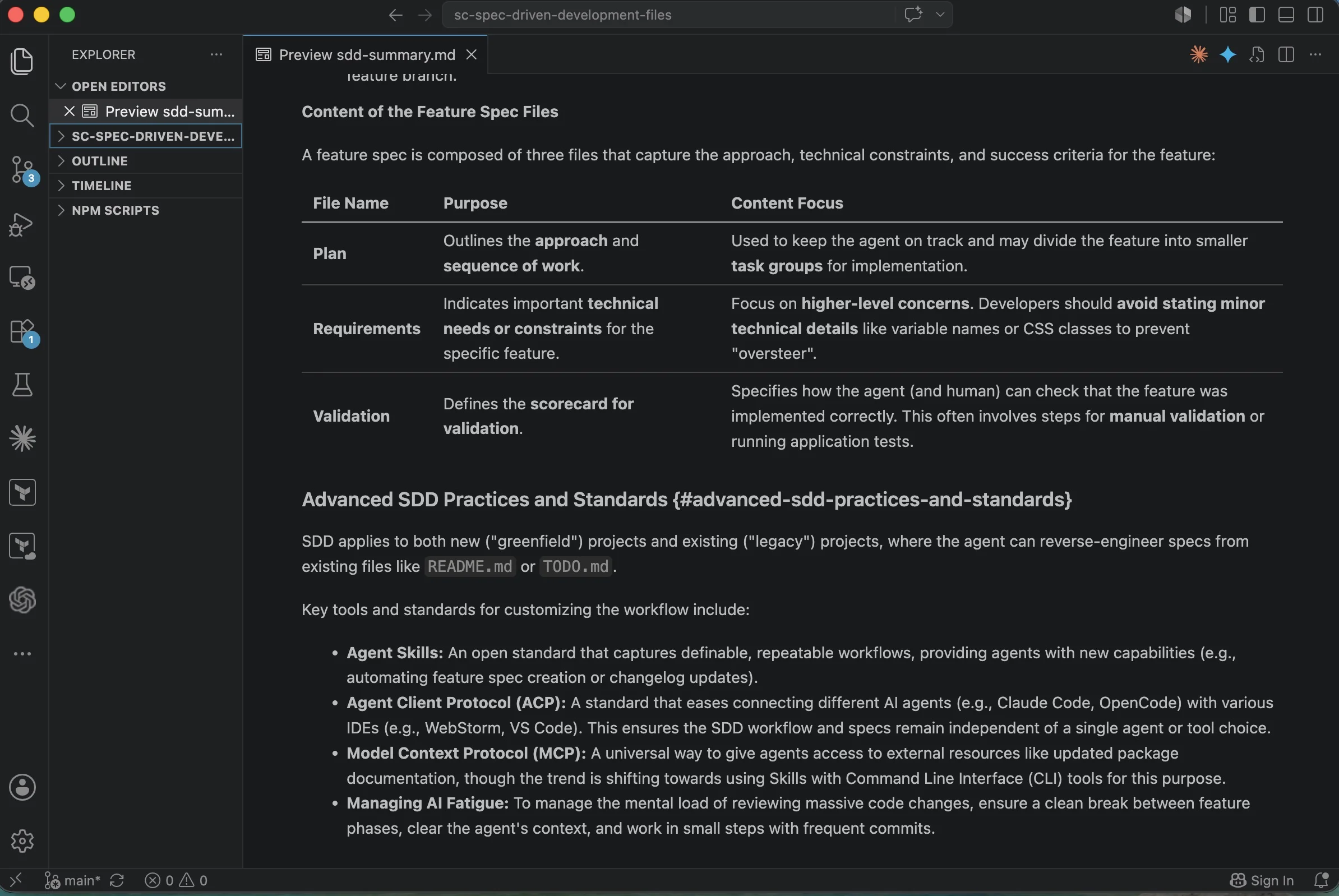
Run /feature-spec and the skill asks three questions (Scope, Decisions, Context) and writes the spec files. You review them before a single line of code is written. If the scope is wrong, you fix it in the document, not after three hours of implementation.
Setting up: creating the skills
The workflow above references /init-constitution, /feature-spec, and /changelog. These are not built-in agent commands: you create them. In Claude Code, a skill is a markdown file in .claude/commands/. When you type /feature-spec, the agent reads .claude/commands/feature-spec.md and follows the instructions in it.
Your full project structure should look like this:
specs/mission.md,tech-stack.md,roadmap.md: the Project Constitutionspecs/_feature-template/: blank copies ofrequirements.md,plan.md,validation.mdto copy per feature.claude/commands/init-constitution.md: skill that interviews you and writes the constitution files.claude/commands/feature-spec.md: skill that finds the next roadmap phase, branches, interviews you, writes the spec files.claude/commands/changelog.md: skill that reads git history and updatesCHANGELOG.md
Each skill file is a short markdown document (20 to 40 lines) that describes what the agent should do when invoked. You are writing instructions for the agent, not code. The agent reads the file and executes the workflow.
What to put in each skill:
init-constitution.md: instruct the agent to ask you questions about the project (what it does, who it's for, what technologies it uses, what the build and test commands are), then write mission.md, tech-stack.md, and roadmap.md based on your answers. Tell it to write real content, not placeholders.
feature-spec.md: instruct the agent to read specs/roadmap.md, find the next incomplete phase, create a git branch named after it, ask you three questions (what the feature includes, what decisions have been made, what context it needs), then write requirements.md, plan.md, and validation.md in a dated directory under specs/.
changelog.md: instruct the agent to read recent git history since the last changelog entry and append a formatted summary to CHANGELOG.md.
/clear is not a custom skill: it is a built-in Claude Code command that clears the conversation context. In Cursor, start a new Composer session instead. In any other agent, reset the context before starting each feature.
The SDD workflow
Every feature follows the same four-step loop: Plan → Implement → Validate → Replan.
Plan. Run /feature-spec, answer three questions, review the generated spec. Ask the agent to clarify anything ambiguous. If a decision in requirements.md is wrong, fix it now, before any code exists.
Implement. Clear the agent's context before starting (/clear in Claude Code; a new Composer session in Cursor) so it reads the spec fresh. Work through the task groups in plan.md in order. Commit after each group. If a group reveals new work, add it to TODO.md; don't extend the current scope.
Validate. Run the checks in validation.md. These are written during the Plan phase, before implementation, so they describe success from the outside, not from the perspective of the code just written.
Replan. After merging, update roadmap.md to mark the phase complete. Run /changelog to update CHANGELOG.md. Close the loop cleanly before starting the next feature.
The most important step is the context clear before each feature. The agent should read the spec fresh every time, not from memory of the previous session. Memory is unreliable. The document is not.
When the spec saves you: a real example
I was adding a new feature to an existing data pipeline service: new ingestion logic for a secondary source, maybe two days of work. The service had a well-established logging setup: a specific structured logging library, a specific log format, and standard field names that the downstream log aggregation system parsed and depended on.
I described the feature to the agent, it built it, and it worked. I shipped it.
The next day, a colleague opened a ticket. The new feature's logs were in a different format and using a different library than everything else in the service. The agent had introduced its own logging approach. Perfectly reasonable as a default; completely wrong for this project.
The fix took two minutes: I opened specs/tech-stack.md and added a Logging section. Library name, log format, the standard field names, a note that all new code must follow the existing pattern. Then /clear, new session, the agent read the updated constitution. The next feature's logging was consistent from the first line.
The agent wasn't wrong to choose what it chose. It just didn't know what it didn't know. The specification exists to document the invisible: the constraints, patterns, and decisions that are obvious to anyone who's worked in the codebase for six months and invisible to an agent that just started reading it.
SDD vs. BMAD, SpecKit, and OpenSpec
SDD isn't the only spec-first approach to AI-assisted development. Three others are worth understanding, and worth comparing against, before you commit to one.
BMAD takes multi-agent orchestration to its logical conclusion: 12+ personas (Analyst, PM, Architect, Developer, QA) with documented hand-offs between each. Every decision creates an audit trail. This is well-suited to regulated environments where you need documented decision provenance, and to teams already operating with formal processes like PRDs and sprint stories. The trade-off is adoption friction. BMAD adds significant process overhead and is tightly coupled to specific agent configurations. If your team isn't already disciplined, BMAD imposes structure before it delivers value.
SpecKit focuses on greenfield projects, built around a constitution.md that compounds as features are added. Slash-command automation and support for 30+ AI agents make it feel similar in spirit to SDD; the main differences are setup requirements (Python 3.11+) and a stronger greenfield focus.
OpenSpec prioritizes brownfield codebases: existing projects where you're adding AI-assisted development rather than starting fresh. It uses a delta model: each spec describes what was ADDED, MODIFIED, or REMOVED, rather than capturing the full project state. Lowest setup friction of the three. If you're working in a mature codebase and retrofitting a full Project Constitution feels like too much overhead, OpenSpec is worth evaluating.
| Framework | Best for | Complexity | Agent model |
|---|---|---|---|
| SDD | New or existing projects, any team size | Low: folder structure + workflow | Agent-agnostic |
| BMAD | Regulated environments, formal processes | High: multi-persona orchestration | Coupled to specific agents |
| SpecKit | Greenfield projects | Medium: requires Python 3.11+ | 30+ agents |
| OpenSpec | Brownfield / existing codebases | Low: delta-based, lightweight | 25+ agents |
All four share one vulnerability: spec drift. The agent writes code that gradually diverges from what the spec describes, and no framework catches this automatically. The discipline is to update the spec alongside the code, not a week later. A stale spec is worse than no spec. It gives the agent confident, wrong instructions.
SDD sits in practical territory: simpler than BMAD, more structured than OpenSpec, works on both new and existing projects. No framework installation, no external dependency. It's a folder structure, three file templates, and a four-step workflow. You own it entirely.
What to do now
Set up a specs/ directory in a project you're actively building. The minimum viable constitution is three files: mission.md, tech-stack.md, and roadmap.md.
Pay particular attention to tech-stack.md. Add every library your project already uses. Add every architectural pattern that exists in the codebase. Add every constraint: naming conventions, error formats, authentication patterns, logging standards, anything an agent might get wrong if it doesn't know about it. The logging example above wasn't unusual. Every project has a dozen invisible constraints the agent will ignore until you name them.
Run /feature-spec before starting your next feature. Review what it generates. If a decision is missing, add it. If the scope includes something you don't want, remove it. The spec takes 15 minutes to write. The inconsistencies it prevents take hours to untangle.
Write the spec. Then write the code.