Technical conference talks are an hour long. Tutorial playlists run to six hours. Documentation sites are hundreds of pages. You can't watch or read all of it, but you can't skip it either. NotebookLM is how you get the signal without sitting through the noise.
The real cost of long video content
The problem with learning from YouTube as a developer is not that the content is bad. Some of the best technical explanations in existence are in conference keynotes and deep-dive talks. The problem is the format: you have to give it your full attention, at normal speed, in sequence, to extract the parts that matter to you.
A one-hour conference talk might contain fifteen minutes of content directly relevant to your situation. The other forty-five minutes is context you already have, questions from the audience, and live demo debugging. You can't easily scan it the way you'd scan a document. You can't search it for a specific term and jump to the timestamp. You're watching a recording of a presentation designed for a room full of people, not for your specific problem.
Multiply this across an entire technology evaluation. You're considering three streaming platforms. Each has a keynote, a deep-dive architecture talk, a migration guide, and a configuration reference. That's days of content. You don't have days. You have a decision to make this week.
This is the gap NotebookLM fills.
What NotebookLM does
NotebookLM is a Google tool that lets you load a collection of sources (YouTube videos, PDFs, web pages, Google Docs, text files) and then query across all of them at once. It reads the transcripts, indexes the content, and lets you ask questions, generate summaries, create mind maps, and export structured overviews.
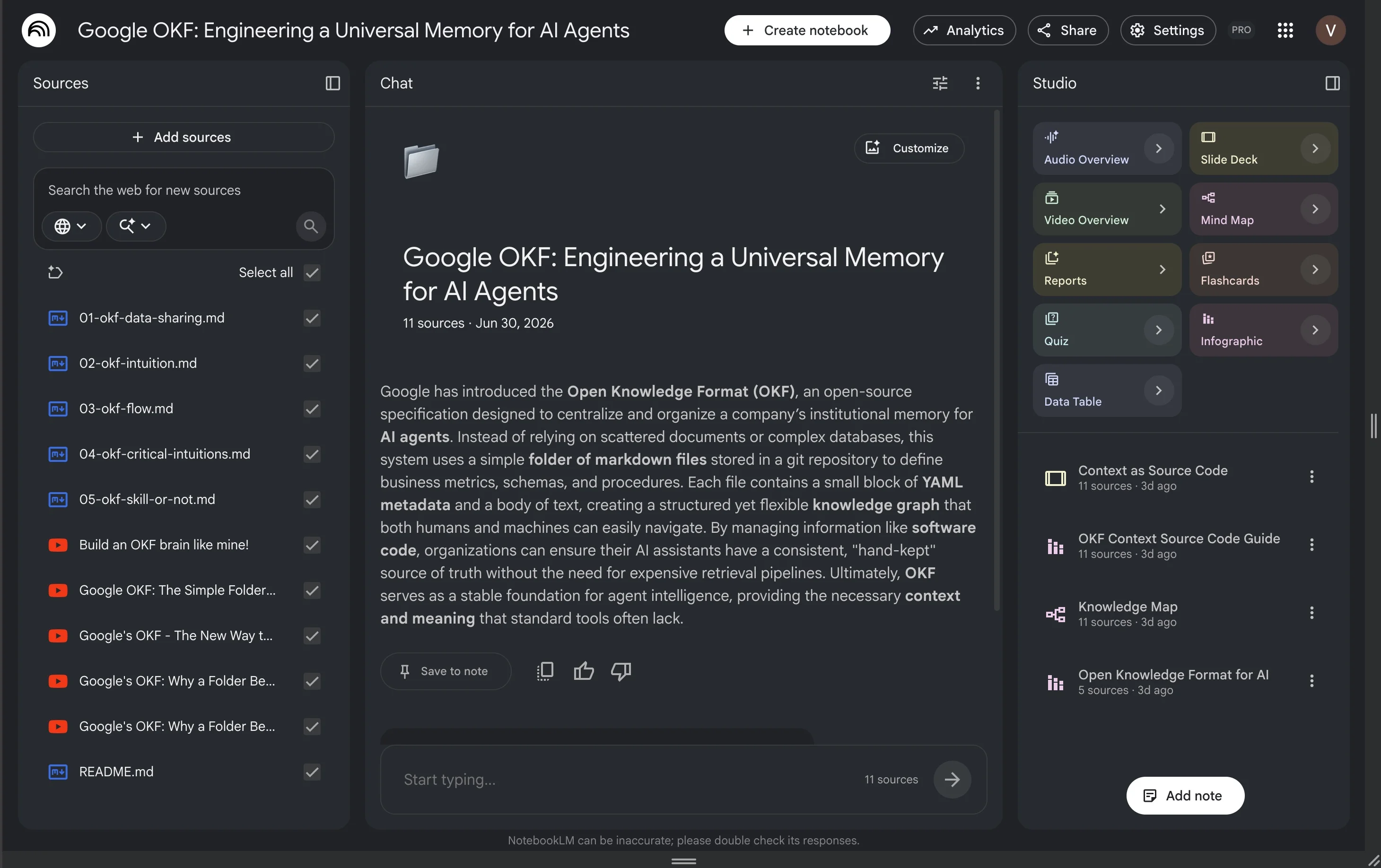
The key word is "across." You're not summarizing one video. You're building a notebook of ten sources and asking: what do these collectively tell me about topic X? What are the trade-offs different sources describe? Where do they agree, and where do they contradict each other?
For technical evaluation work, this is what makes it genuinely useful. You can load a vendor's official documentation alongside a community talk that describes what actually happened in a real migration, alongside a GitHub issue thread where users report bugs. Then ask: given all of this, what are the real risks?
The workflow
The setup takes about ten minutes. What you do with it after that is where the time savings compound.
- Create a notebook for the topic. One notebook per technology or decision. Not a general "learning" notebook that mixes unrelated topics.
- Add your sources. For each YouTube video, paste the URL directly: NotebookLM pulls the transcript automatically. For PDFs and docs, upload or link them.
- Generate the overview. NotebookLM creates an automatic summary of the entire notebook. This is your starting point, not your ending point.
- Generate a mind map. Use the mind map feature to see the structural relationships between concepts across all your sources. This is where a dense topic becomes navigable.
- Ask specific questions. Once you understand the shape of the material, ask the specific questions that matter for your context. Which sources does each answer draw from? What does source A say that source B contradicts?
The output is not a replacement for the source material. It's a map of the source material that lets you decide where to read deeply and where to skip entirely.
What to load
For a typical technology evaluation, a useful notebook includes: the official documentation (or the key pages), two or three conference talks by the core team, one or two community talks from practitioners who have deployed it in production, and any migration guides or known limitation pages. Ten to fifteen sources is a productive range. More than that and the summaries get vague; fewer and you're missing important context.
How to ask questions that get useful answers
Vague questions produce vague answers. "What are the main features?" produces a generic overview you could have gotten from the landing page. Specific questions that reference your actual situation produce useful answers.
Better questions:
- "What do these sources say about behavior when a consumer falls behind by more than the retention window?"
- "Where do the official documentation and the community talks disagree about schema evolution?"
- "What operational problems do practitioners report that aren't mentioned in the vendor documentation?"
- "Which sources discuss exactly-once semantics, and what do they say about the conditions under which it holds?"
The last type is especially valuable: asking NotebookLM to surface disagreement between sources. Official documentation almost never mentions edge cases that break in production. Community talks often do.
What this looks like in practice
When my team was evaluating streaming platforms for a new data pipeline, I needed to compare Kafka, Pulsar, and Redpanda as the message layer. Each had years of conference content on YouTube and extensive official documentation. Reading all of it properly would have taken a week.
I built three notebooks: one per platform. Each notebook had the architecture keynote from the main conference, two practitioner talks from engineers who had run it at scale, the operations documentation, and the known limitations page. About twelve sources each.
The first thing I generated was the mind map for each notebook. The Kafka mind map showed the ecosystem complexity immediately: coordination with ZooKeeper (at the time), the consumer group model, the replication architecture. The Redpanda mind map showed a much simpler structure: no external coordination, the same API surface, different operational model. Seeing that structural difference in a mind map took thirty seconds. Reading to the same conclusion would have taken two hours.
Then I asked the same questions across all three notebooks: "What do practitioners say about operational complexity at scale?" "What failure modes are described that aren't in the official documentation?" "What are the reported limitations when running this in a containerized environment?"
The answers gave me a targeted reading list: eight specific sections across the source material that I needed to read in full. Everything else I could skip. The actual close reading took another two hours. Total: two and a half hours for a decision I had been putting off because it felt like a week of work.
What NotebookLM is not good for
NotebookLM is a wide-angle lens. It is not a precision instrument. There are specific situations where it does not give you reliable answers, and knowing these limits is as important as knowing the capabilities.
Verifying specific behavior against source code. If you need to know whether a connector actually implements upsert the way the documentation claims, NotebookLM cannot tell you. It can only summarize what the documentation says. The gap between what documentation claims and what code does is exactly what NotebookLM cannot close. For that, you need to analyze the source code directly with Claude.
Current information. NotebookLM works from the sources you provide. If the last conference talk you loaded is from eighteen months ago, the notebook doesn't know what changed since then. For current state, use Gemini with its web access turned on, or check the changelog directly.
Deep technical precision. NotebookLM produces good summaries. It does not produce the kind of precise, source-cited, technically accurate analysis you get from Claude when you load specific files and ask specific questions. Use NotebookLM to get oriented; use Claude to go deep.
NotebookLM, Claude, and Gemini: three tools with different jobs
The most effective way to use these tools is to use them in sequence, not as alternatives to each other.
| Tool | Job | When to use it |
|---|---|---|
| NotebookLM | Go wide, fast | First pass on a new topic: synthesize everything available, get oriented, find what to read closely |
| Claude | Go deep, precise | Targeted analysis of specific source code, documents, or decisions once you know exactly what to examine |
| Gemini | Current information | When you need to know what changed recently: current version behavior, new releases, recent community discussion |
The workflow is: NotebookLM first to get the landscape, Gemini to check what's current, Claude to verify the specific claims that your production decision actually depends on. Each tool does one thing better than the others. Using all three in sequence is faster than using any one of them for everything.
NotebookLM tells you what to read. Claude tells you what the code actually does.
Why this matters more for experienced developers
Junior developers often process technical content by reading everything sequentially from the beginning. It works, but it's slow, and it treats all content as equally important.
Experienced developers know which questions are load-bearing for a given decision and which are incidental. They know that the operational complexity section matters more than the getting-started guide, that the "known limitations" page tells you more than the feature overview, that a practitioner talk from someone who deployed it in production tells you things the official documentation won't.
NotebookLM is faster in the hands of an experienced developer because you already know which questions to ask. You're not using it to learn a topic from scratch. You're using it to quickly extract the specific information you need to make a decision you have the experience to make.
The tool does the synthesis. Your experience decides what to synthesize.
What to do now
Pick one technology you're currently evaluating or that you've been meaning to understand better. Find three to five YouTube videos on it: one official deep-dive, one practitioner talk, one migration or case study. Create a NotebookLM notebook, add them, and generate the mind map.
You don't need to read anything first. Look at the mind map and identify the two or three concepts that are most relevant to your specific situation. Then ask NotebookLM a specific question about each one. You'll have a clearer picture of the technology in an hour than most people get from a week of intermittent reading and video watching.